


Type Sprint: Typing Games
4.52.01K Reviews
App Specs
- Version
- 1.14.2
- Updated On
- License
- Free
- Downloads
- 10,000,000+
- Developer
- Masterskaya DK
- Categories
- Trivia
- Platform
- Android
Screenshots
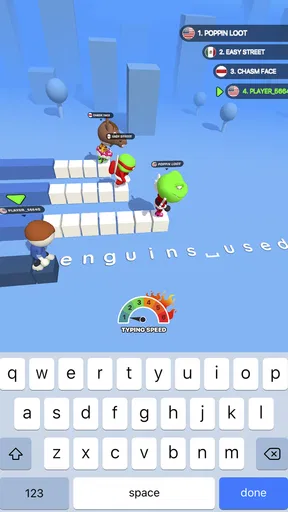
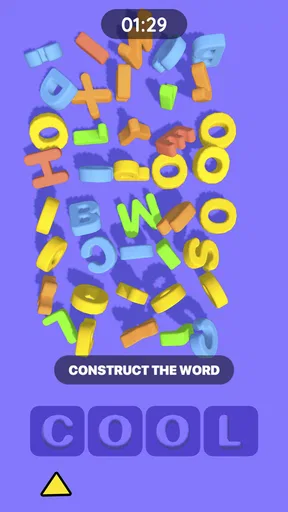
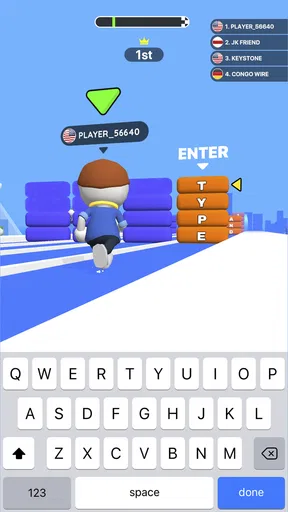
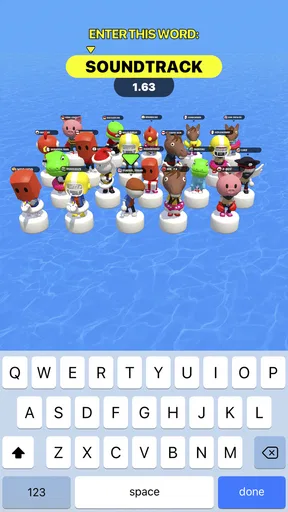
 Analysis by AppCompare
I like typing practice more when it feels like something I can do in a spare minute instead of a chore I need to schedule. Type Sprint: Typing Games turns entering words into a race: you type to move ahead, so accuracy and pace both matter. That simple idea makes it easy to understand quickly, though it also means the game is best suited to short bursts rather than a deep, long-form typing course.
A quick way to get into a race
My sensible starting routine is to play one round at a comfortable pace before trying to beat anyone. That gives my hands a moment to adjust to the on-screen text and lets me notice whether I am rushing, mistyping, or hesitating over familiar words. I then use another round to push speed a little. Treating those as separate goals is more useful than trying to type at maximum speed from the first second.
The game’s appeal is its immediate feedback: words become a physical-looking race rather than an abstract score. If I have a few minutes between tasks, I can play a round without needing to plan a lesson or remember a complicated set of rules. It is a small but practical distinction from many typing tutors, which often focus on drills and structured lessons. Those tools are the better choice when I want systematic instruction; this one is more appealing when I want practice to feel playful.
Settings and habits that make practice count
I would check the available controls and presentation options before settling into a routine, then keep the setup consistent for a few sessions. A stable setup makes it easier to judge whether a change in performance comes from my typing rather than from switching the way I play. I would also avoid treating a single result as proof of improvement: a short run can be affected by attention, fatigue, or simply getting a word pattern that feels easy.
A useful habit is to decide on one focus before each race. I might prioritize clean keystrokes in one session and a steadier rhythm in the next. If I chase speed and accuracy at once, I tend to tense up and make avoidable errors. I also find it helpful to stop after a small number of focused rounds instead of repeating races on autopilot. Once I am no longer paying attention to the words, extra play is less likely to teach me anything.
Where the racing format helps—and where it doesn’t
The competitive framing works well for people who already know the keyboard and want a lightweight reason to practice. A student waiting for a ride, for example, could use a short session to wake up their fingers before homework. Someone who types all day might use it as a brief change of pace, although it should not be mistaken for training in accuracy across long documents. The skills overlap, but a race cannot reproduce every demand of real writing.
There is a trade-off in making typing feel like a contest: it can motivate me to return, but it can also tempt me to sacrifice clean input for speed. If a round leaves me frustrated, slowing down is a better response than hammering through more races. Players who want detailed lessons, sustained writing practice, or a calm activity without competition may be happier with a conventional typing tutor or a word game. The right alternative depends on whether the goal is learning technique, producing text, or simply having a quick challenge.
Worth Reading Before You Choose

Baby Panda World Brings Quick Play to Modern Phones, but Its Game Library Feels Busy

ESPN’s Live Game View Makes Following Close Games Easier

QuizzLand Review: A Good Fit for Short Trivia Breaks, Not Every Player

Basketball Stars: Multiplayer Is Fast, but Can It Recover When Matches Go Wrong?

WEBTOON Turns Phone Updates Into a Better Reading Routine

Link to Windows Runs on Shared Habits, Not Social Feeds
Racing Through the Basics
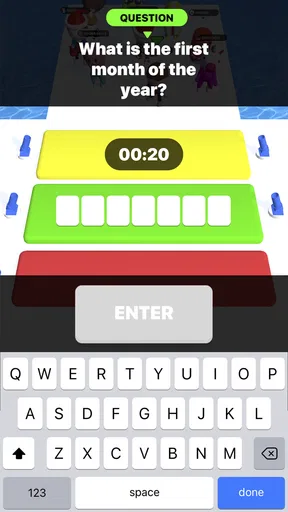
Once you fire up Type Sprint: Typing Games, you’re greeted with a vibrant interface that screams "Let’s get moving!" The game is all about typing words as quickly as you can to outrun your competitors. It’s like Mario Kart, but with words. You can jump straight into a match or take a moment to practice in solo mode. Trust me, a little warm-up never hurts!
Features That Keep You Hooked
The app boasts a variety of game modes to keep things fresh. Whether you’re racing against the clock or pitting your skills against players worldwide, there’s something here for everyone. And the best part? There’s a leaderboard! So, if you’re the competitive type like me, you’ll love climbing those ranks. Plus, the app throws in some cool themes and avatars, which add a personal touch to your racing profile.
Why I Can't Put It Down
Honestly, it’s the challenge and the thrill of beating your personal best that keeps me coming back. There’s something so satisfying about seeing your words per minute go up. The app also does a stellar job at tracking your progress, so you can look back and see just how much you’ve improved. Who doesn’t love a good progress chart?
Areas for Improvement
While Type Sprint: Typing Games is a blast, there are a few tweaks that could make it even better. For starters, I’d love to see more diverse word packs. Sometimes, the words can get a bit repetitive, and a fresh set could spice things up. Additionally, incorporating more social features, like friendly challenges, could make the app even more engaging.
That limitation matters most if you are using the game to build a broad vocabulary or prepare for the varied punctuation and sentence patterns found in everyday writing. Repeated familiar words can still help with rhythm and finger confidence, but they are not a substitute for practicing the kinds of text you actually need to type. I would pair the races with ordinary writing or a dedicated typing lesson if accuracy across longer passages is the real goal. The game earns its place as a warm-up and motivation tool, not as a complete keyboard curriculum.
Who will get the most from it
As a trivia-style game built around typing races, Type Sprint is a good fit for people who enjoy quick competition and want a reason to practice without opening a formal course. Its publisher is Masterskaya DK, and its 4.4 average from around 117,000 ratings suggests that many players find the idea appealing. It has passed 10 million installs, is free, and carries an Everyone age rating. Those details make it approachable for casual play, but the best reason to try it is still whether racing makes you want to type more often.
A realistic use is a short break before starting a school assignment or a work session: play a race, notice whether your hands feel settled, then move to the actual task. I would not use a leaderboard position as a measure of how well I will write an email or report. It reflects performance in the game’s particular setting, while real documents involve thinking, editing, and choosing words as well as typing them. For children or family play, the all-ages rating is reassuring, but I would still treat online competition as a game environment and keep normal device-use boundaries in place.
Small decisions that improve a repeatable routine
One non-obvious way to make the progress view useful is to compare like with like. I try to play at roughly the same time and with the same goal, rather than comparing a relaxed practice run with a hurried competitive one. If I have a frustrating result, I first ask whether I was tired or distracted before assuming my typing has worsened. This makes the game’s progress tracking more informative and prevents a single rough round from dictating the next session.
I also recommend using the solo option when I want to focus on consistency, then switching to a competitive match when I want extra pressure. That is a practical way to separate deliberate practice from entertainment. If changing themes or avatars is available in the current build, I would regard it as personalization rather than a performance setting; the useful habit is choosing a comfortable presentation and leaving it alone while comparing results. The game remains most effective when the routine is simple enough to repeat.
Type Sprint is developed by Masterskaya DK, and the current version is 1.13.1, with Android support starting at 7.1. I would check that requirement before installing on an older device. It was released on June 15, 2021, and its continuing appeal rests on a clear, accessible loop rather than on the need to learn a complicated system. For a free game, that low-friction entry is welcome, although players should approach it as a focused little diversion rather than assume that every typing feature they might expect from a tutor is included.
When I would choose something else
If my priority were formal typing technique, lessons that build from key placement, or practice with long passages, I would choose a dedicated tutor first and use this game only as a change of pace. If I wanted a word puzzle, I would pick a game built around clues and vocabulary rather than speed. Type Sprint occupies a narrower middle ground: it turns familiar typing into a race, which is precisely why it can be easier to revisit than a lesson, but also why it cannot meet every learning goal.
Before installing, the practical questions are straightforward. Is it free to start? Yes. Is it suitable for a broad age range? Its rating is Everyone. Does it make sense for someone who already types quickly? It can, if they enjoy chasing a better run or competing, though it may offer less value to someone who wants advanced instruction. Do I need to be highly competitive? No; the value can come from a solo warm-up and personal targets, while leaderboard play is there for people who enjoy comparison.
Final Thoughts
In a nutshell, Type Sprint: Typing Games is the perfect blend of fun and functionality. Whether you’re looking to improve your typing skills or just need a fun way to pass the time, this app has got your back. So, what are you waiting for? Get those fingers moving and see how fast you can go!
My more measured recommendation is to use it for short, repeatable bursts: warm up, focus on one habit, and stop before the race becomes mindless tapping. I enjoy how it gives typing a playful purpose, but I would not call it a replacement for a tutor or real writing practice. If that balance suits you, this is an easy game to keep around for spare moments; if you need structured lessons or varied text, another option will serve you better. Either way, the best measure of progress is whether your everyday typing feels steadier, not just whether you win a race.
Pros
- Engaging gameplay enhances typing speed.
- Variety of levels keeps it interesting.
- Real-time feedback improves accuracy.
- User-friendly interface for all ages.
- No ads disrupt gameplay experience.
Cons
- Limited customization for advanced users.
- Requires internet for certain features.
- Some levels feel repetitive over time.
- No offline mode for traveling users.
- In-app purchases can be pricey.
FAQs for Type Sprint: Typing Games
What is Type Sprint: Typing Games?
Type Sprint: Typing Games is an engaging mobile app designed to enhance your typing speed and accuracy. It offers a variety of challenging levels and fun mini-games to help users practice typing in an interactive way. Suitable for all ages, it turns learning into an enjoyable experience.
Is Type Sprint: Typing Games suitable for beginners?
Yes, Type Sprint: Typing Games is perfect for beginners. The app provides introductory levels that ease users into typing, gradually increasing in difficulty. This ensures that both novice and experienced typists can benefit from the app, improving their skills at their own pace.
Does Type Sprint: Typing Games offer customizable settings?
Yes, the app offers several customizable settings to enhance user experience. You can adjust the difficulty level, change themes, and even select different keyboard layouts. This personalization helps users tailor the app to meet their individual learning needs and preferences.
Can I track my progress in Type Sprint: Typing Games?
Absolutely! Type Sprint: Typing Games includes a comprehensive progress tracking feature. It provides detailed statistics on your typing speed, accuracy, and improvements over time. This allows users to monitor their progress and set personal goals for continuous development.
Is Type Sprint: Typing Games available for free?
Type Sprint: Typing Games offers a free version with basic features. However, there are in-app purchases available for users who want to access additional content, such as advanced levels and exclusive mini-games. This allows users to choose the experience that best fits their needs and budget.


